 Kids Math: Elementary Practice
The math your child finds hard,
practiced step by step at home.
Kids Math: Elementary Practice is a math app where parents pick a level and unit to create arithmetic problems, then track each child's accuracy, weak units, and wrong-answer review.
Get it free on Google PlayAndroid app · Ages 4-13 · 10 free problems a day
In the app, the name appears as “My Kid's Custom Math”.
Made for parents who
No need to buy extra workbooks. Create new arithmetic problems at your child's level every day.
Need fresh problems every day
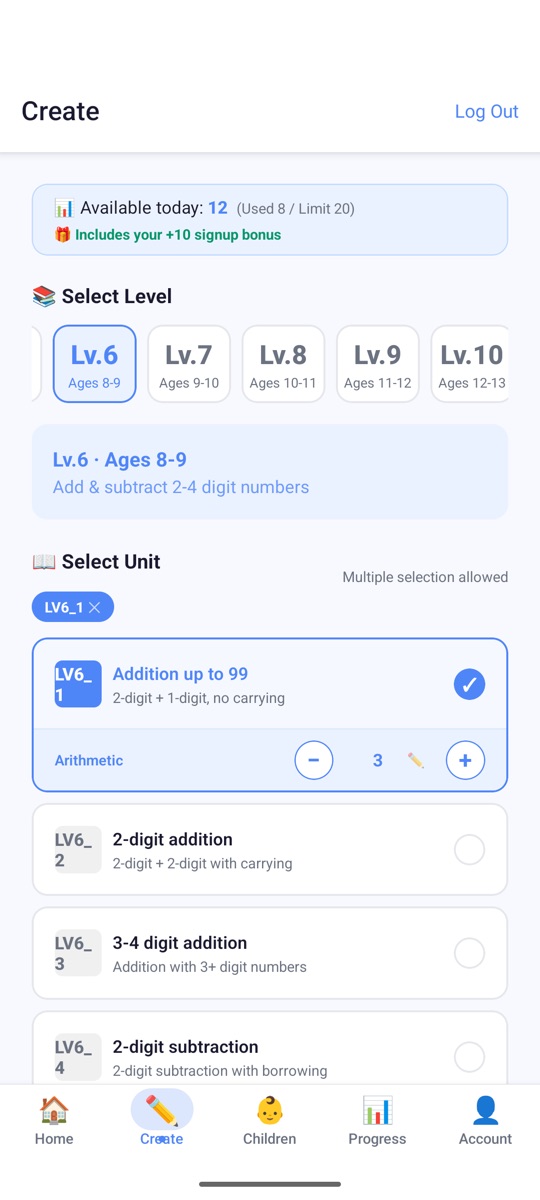
Pick a unit and the number of problems, and they are created right away. Each time you create problems, even for the same unit, you get new ones.
Want to know where their child gets stuck
Accuracy is collected by unit and shown as Weak, Average, or Good. You can pick only the weak units for more practice.
Have more than one child
Add several children to one parent account, each with their own level and records.
How it works
The parent creates and grades the problems, so the child can focus on solving.
-
1
Parent
Create problems
Choose a level and unit, then set the number of problems. You can also mix several units.
-
2
Child
Solve
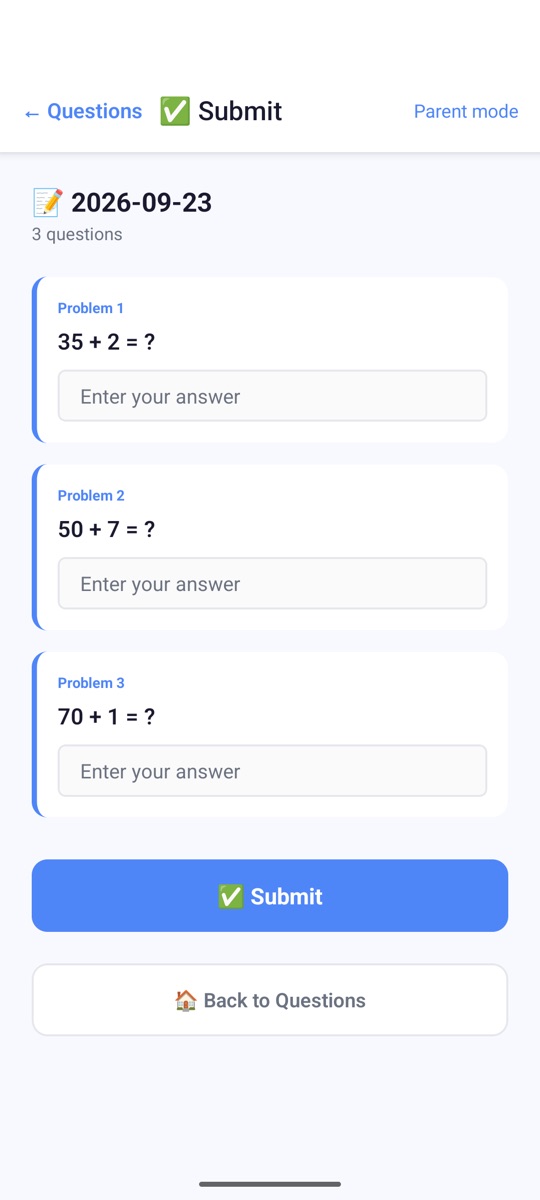
The child enters answers and submits them on their own device or the parent's phone.
-
3
Parent
Grade
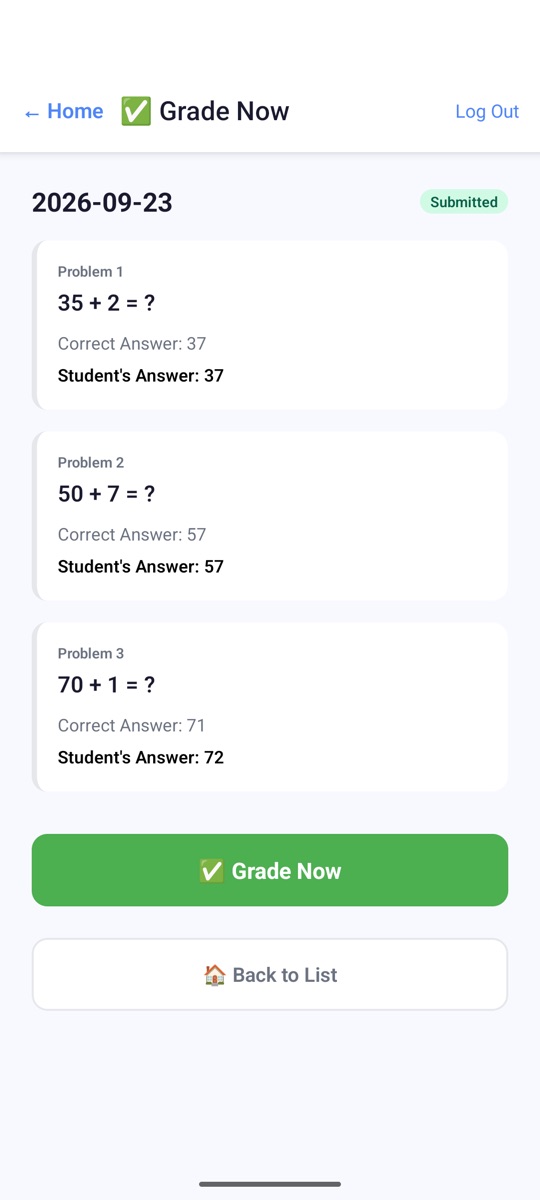
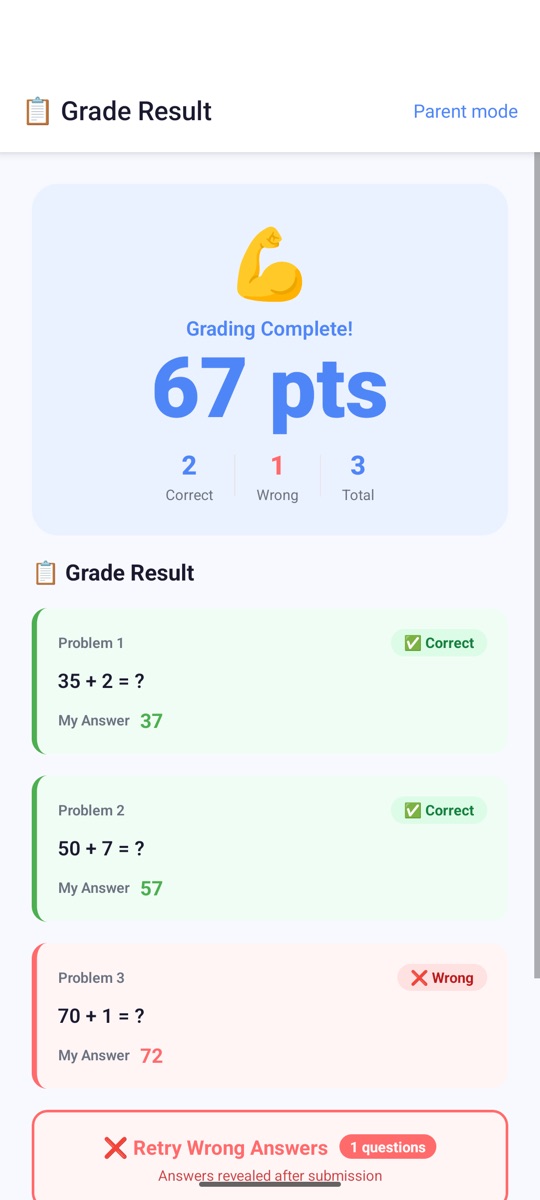
Check the correct answers and your child's answers on one screen, then grade with one tap.
-
4
Child
See results and retry
Check the score and the wrong answers, then retry only the problems they got wrong.
What it covers: ages 4 to 13, 50 units
From counting to mixed operations and equations, the app has 10 levels (LV1-LV10), each with 5 units. Tap a level to see its units.
LV1Ages 4-5Counting up to 30
- Count to 10
- Count to 30
- Number order
- Compare numbers
- Counting review
LV2Ages 5-6Number concepts & comparison
- Numbers to 10
- Numbers 11-20
- Count by 10s
- Compare 2-digit numbers
- Numbers 100-299
LV3Ages 6-7Addition 1-4
- Add 1
- Add 2
- Add 3 · Pairs to 10
- Add 4
- Addition 1-4 review
LV4Age 7Addition 5-10
- Add 5 & 6
- Add 7 & 8
- Add 9 & 10
- Add 5-10 · 2-digit addition
- Large addition review
LV5Ages 7-8Subtraction
- Subtract 1-3
- Subtract 4-10
- Subtract from ≤16
- Subtract from ≤25
- Addition & Subtraction review
LV6Ages 8-9Add & subtract 2-4 digit numbers
- Addition up to 99
- 2-digit addition
- 3-4 digit addition
- 2-digit subtraction
- 3-4 digit subtraction
LV7Ages 9-10Multiplication tables · Division
- Multiplication tables
- 2-digit multiplication
- 3-4 digit multiplication
- Division basics · Remainders
- 2-3 digit division
LV8Ages 10-11Advanced × ÷ and fractions
- 2-3 digit multiplication
- Multiples of 10 ×÷
- Divide by 2-digit
- Fraction basics
- Add, subtract & simplify fractions
LV9Ages 11-12Fractions · Decimals
- Fraction addition
- Fraction subtraction
- Fraction × ÷
- Fractions ↔ Decimals
- Decimal operations
LV10Ages 12-13Order of operations, equations, decimals
- Fraction operations review
- Mixed operations
- Mixed ops with ( )
- Find the unknown □
- Decimal operations review
Weak units, based on accuracy
The app groups your child's solved problems by unit and shows three levels based on accuracy. Weak units are shown when you create problems, so you can practice just those units again.
- Good90% or higher
- Average70-89%
- Weakbelow 70%
Pricing
You can start for free and choose a paid plan when you need more problems. Daily limits apply per parent account.
Free
10 problems / day
- Watch an ad before creating problems
- Bonus problems on your first day
Standard
60 problems / day max
- Create problems without ads
Premium
120 problems / day max
- Create problems without ads
Paid plans can be bought in the app as a subscription or a 30-day pass. Please check the price shown in the app and on Google Play.
Frequently asked questions
What ages and grades is it for?
It covers ages 4-5 (LV1) through ages 12-13 (LV10). You can choose a lower or higher level to match your child's skill rather than their age.
What kinds of arithmetic can my child practice?
50 units including counting and comparing numbers, addition and subtraction (with carrying and borrowing), multiplication tables, multiplication and division (with remainders), fractions, decimals, mixed operations, and equations using □.
How much can I use for free? Are there ads?
The Free plan lets you create up to 10 problems a day, and an ad plays before problems are created. You get bonus problems on your first day. Standard (up to 60 problems a day) and Premium (up to 120 problems a day) have no ads.
Do the parent and child each need a phone?
No. Your child can solve right away on your phone with “Solve on this phone”. If your child has their own device, they sign in with the family code and their own 4-digit PIN.
Can I manage more than one child?
Yes. You can add several children to one parent account, and each child's problems, grading records, and weak units are kept separately. The daily limit applies per parent account.
How are weak units decided?
By your child's accuracy in each unit. 90% or higher is Good, 70-89% is Average, and below 70% is Weak.
How does my child retry wrong answers?
Tap “Retry Wrong Answers” on the results screen to solve only the problems your child got wrong. The correct answers are shown only after they submit again, so your child thinks it through first.
Is it available on iPhone?
Right now, only the Android app (Google Play) is available.
Do I need to sign up?
No, you can start right away without signing up. To keep your records and subscription when you change phones or reinstall the app, link a Google or email account.
Which languages does it support?
13 languages: Korean, English, Japanese, Chinese (Simplified and Traditional), Spanish, Portuguese, French, German, Russian, Thai, Indonesian, and Vietnamese.
How do I delete my account and data?
You can delete your account directly in the app, or request deletion through the Account deletion page or by email (alsntud1004@gmail.com).